What is the difference between opacity and rgba() transparency in CSS?
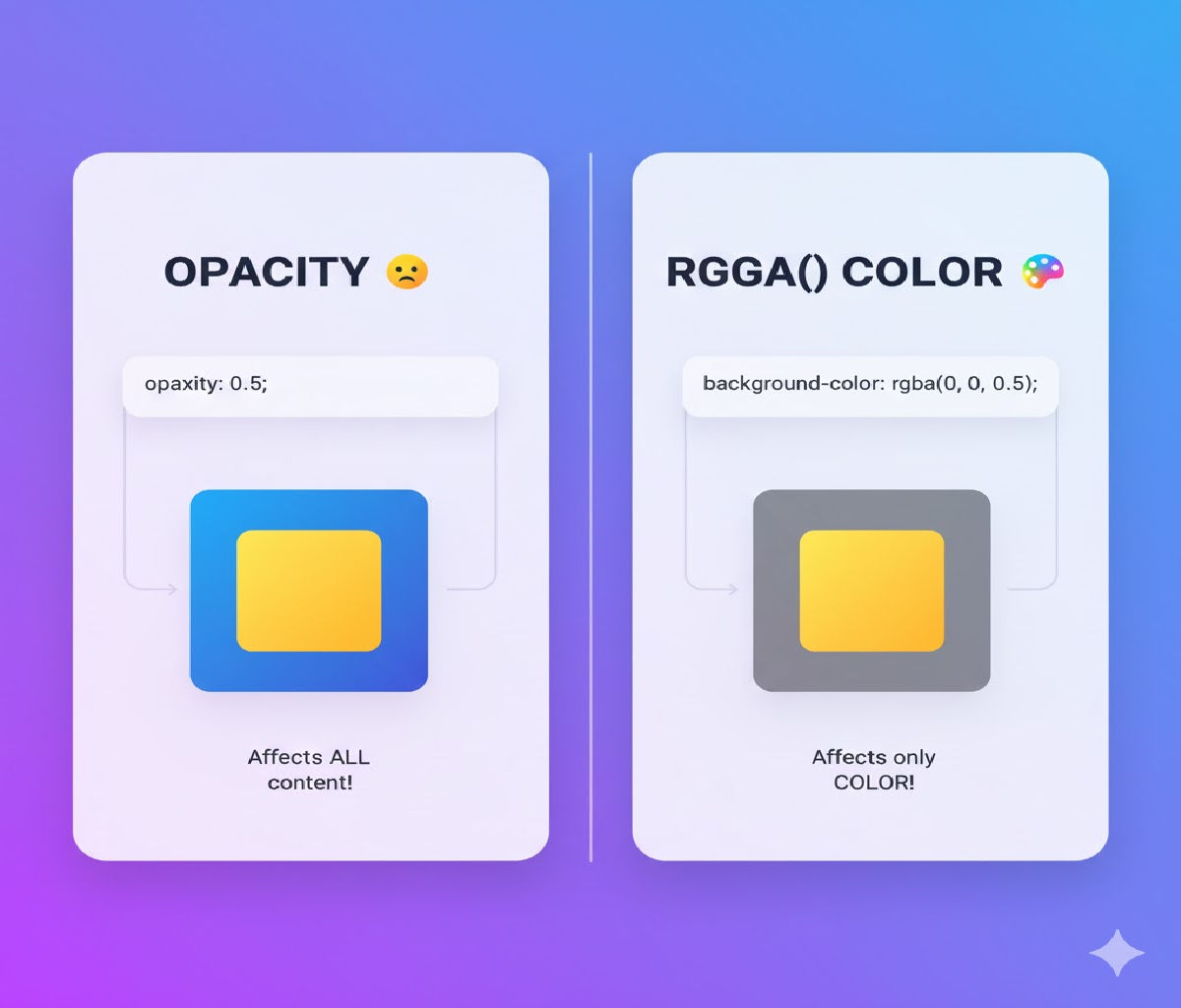
Difference between opacity and rgba() in CSS
Transparency is a core concept in modern web design. It helps create layered interfaces, soft backgrounds, overlays, hover effects, and visually appealing UI components. CSS provides more than one way to control transparency, and two of the most commonly used techniques are:
- The
opacityproperty - The
rgba()color function
While both allow you to create transparent effects, they behave very differently — especially when it comes to child elements, text readability, layering, animations, and accessibility.
In this detailed guide, you’ll learn:
✅ What opacity is and how it works
✅ What rgba() transparency is and how it works
✅ The key differences between them
✅ When to use each method
✅ Real-world examples with code
✅ Performance and accessibility considerations
✅ Common mistakes and best practices
By the end, you’ll know exactly which method to use in any situation.
📌 Understanding Transparency in CSS
Transparency means making an element partially or fully see-through so that content behind it becomes visible. In CSS, transparency values typically range from:
- 0 → Fully transparent
- 1 → Fully opaque
Both opacity and rgba() use this scale but apply it in different ways.
🧩 Part 1: What Is opacity in CSS?
The opacity property controls the transparency level of an entire element — including all of its child elements and content.
✅ Syntax
element {
  opacity: value;
}
Where value ranges from:
0→ Fully transparent1→ Fully visible0.5→ 50% transparent
🧪 Basic Example of opacity
<div class="box opacity-box">
  <p>This text is also faded</p>
</div>
.opacity-box {
  width: 200px;
  height: 100px;
  background-color: blue;
  opacity: 0.5;
  color: white;
}
🔍 What Happens Here?
- The entire box, including:
- Background
- Text
- Border
- Child elements
becomes semi-transparent.
This makes opacity useful for:
✔ Disabled buttons
✔ Faded UI elements
✔ Hover effects
✔ Transitions
But it also introduces limitations, especially when text readability matters.
🧩 Part 2: What Is rgba() Transparency in CSS?
The rgba() function defines colors using:
- R → Red (0–255)
- G → Green (0–255)
- B → Blue (0–255)
- A → Alpha (0–1), which controls transparency
Unlike opacity, rgba() applies transparency only to the color value itself, not the entire element or its children.
✅ Syntax
background-color: rgba(red, green, blue, alpha);
Example:
background-color: rgba(0, 0, 255, 0.5);
This means blue at 50% transparency.
🧪 Basic Example of rgba()
<div class="box rgba-box">
  <p>This text stays solid</p>
</div>
.rgba-box {
  width: 200px;
  height: 100px;
  background-color: rgba(0, 0, 255, 0.5);
  color: white;
}
🔍 What Happens Here?
- The background is semi-transparent
- The text remains fully opaque
This makes rgba() ideal for:
✔ Overlays
✔ Readable text on translucent backgrounds
✔ Cards and modals
✔ UI panels
🔥 Core Difference Between opacity and rgba()
| Feature | opacity | rgba() |
|---|---|---|
| Affects background | ✅ Yes | ✅ Yes |
| Affects text | ✅ Yes | ❌ No |
| Affects child elements | ✅ Yes | ❌ No |
| Controls whole element | ✅ Yes | ❌ No |
| Controls specific color only | ❌ No | ✅ Yes |
| Useful for fading elements | ✅ Yes | ⚠ Limited |
| Good for overlays with readable text | ❌ No | ✅ Yes |
🧪 Side-by-Side Comparison Example
HTML
<div class="demo">
  <div class="opacity-box">
    <p>Opacity Example</p>
  </div>

  <div class="rgba-box">
    <p>RGBA Example</p>
  </div>
</div>
CSS
.demo {
  display: flex;
  gap: 20px;
}

.opacity-box {
  width: 220px;
  height: 120px;
  background-color: red;
  opacity: 0.5;
  color: white;
  padding: 10px;
}

.rgba-box {
  width: 220px;
  height: 120px;
  background-color: rgba(255, 0, 0, 0.5);
  color: white;
  padding: 10px;
}
🧠 Visual Outcome
- Opacity box: Both the background and text look faded.
- RGBA box: Background looks faded, but the text stays bright and readable.
This simple difference changes everything when designing real-world UI layouts.
🏗 Real-World Use Cases
Let’s explore practical scenarios where the choice between opacity and rgba() matters.
✅ Use Case 1: Disabled Button (Best with opacity)
Why?
You want the entire button — including text and icon — to look faded.
<button class="btn disabled">Submit</button>
.btn {
  padding: 10px 20px;
  background: green;
  color: white;
  border: none;
  border-radius: 5px;
}

.disabled {
  opacity: 0.5;
  cursor: not-allowed;
}
🧠 Here, opacity is perfect because it visually communicates that the whole button is inactive.
✅ Use Case 2: Card Overlay with Readable Text (Best with rgba())
Why?
You want a translucent background but solid text.
<div class="card">
  <div class="overlay">
    <h3>Premium Content</h3>
    <p>Unlock now to continue</p>
  </div>
</div>
.card {
  width: 300px;
  height: 200px;
  background: url("image.jpg") center/cover no-repeat;
  position: relative;
}

.overlay {
  position: absolute;
  inset: 0;
  background: rgba(0, 0, 0, 0.6);
  color: white;
  padding: 20px;
}
🧠 If you used opacity here instead, the text would also become faded and harder to read.
✅ Use Case 3: Hover Fade Effect (Best with opacity)
.image {
  transition: opacity 0.3s ease;
}

.image:hover {
  opacity: 0.7;
}
🧠 Since you want the entire element to fade smoothly, opacity is the best choice.
✅ Use Case 4: Translucent Navigation Bar (Best with rgba())
.navbar {
  background-color: rgba(255, 255, 255, 0.85);
  backdrop-filter: blur(10px);
}
🧠 This gives a frosted-glass look while keeping text sharp and readable.
⚙ How opacity Works Internally
When you apply opacity, the browser:
- Renders the element and its children normally.
- Then applies transparency to the entire rendered layer.
This means:
- Borders
- Shadows
- Pseudo-elements
- Child elements
All become semi-transparent.
⚙ How rgba() Works Internally
When you use rgba():
- The browser applies transparency only to that specific color value.
- Child elements and other properties remain unchanged.
This gives more precise control over visual design.
🧠 Accessibility Considerations
Accessibility is critical in UI design. Let’s see how these properties affect usability.
❌ Problem with opacity
Using opacity on containers that hold text can reduce contrast and violate WCAG guidelines.
Example:
.container {
  background: black;
  color: white;
  opacity: 0.5;
}
This lowers both background and text contrast, making content harder to read.
✅ Better with rgba()
.container {
  background: rgba(0, 0, 0, 0.5);
  color: white;
}
Now the background is translucent, but the text contrast remains strong.
🎬 Animations and Transitions
Animating opacity
.box {
  opacity: 0;
  transition: opacity 0.5s ease;
}

.box.show {
  opacity: 1;
}
This creates smooth fade-in and fade-out effects and is very performant because opacity animations are GPU-accelerated.
Animating rgba()
.box {
  background-color: rgba(0, 0, 255, 0);
  transition: background-color 0.5s ease;
}

.box.show {
  background-color: rgba(0, 0, 255, 0.7);
}
This works too, but animating colors is generally more expensive than animating opacity.
🏎 Performance Considerations
| Property | Performance |
|---|---|
opacity | ⭐⭐⭐⭐⭐ Excellent (GPU accelerated) |
rgba() | ⭐⭐⭐ Good (depends on repaint complexity) |
Best Practice:
✔ Use opacity for fade animations
✔ Use rgba() for static translucent backgrounds
🧩 Using Modern Alternatives: hsla() and Hex Alpha
In addition to rgba(), modern CSS supports:
🔹 hsla()
background: hsla(210, 100%, 50%, 0.5);
🔹 Hex Alpha
background: #00000080; /* 50% transparency */
These behave exactly like rgba() — transparency applies only to the color, not the element.
❌ Common Mistakes
❌ Mistake 1: Using opacity on a parent container
.modal {
  opacity: 0.6;
}
This fades everything inside, including buttons and text — often unintentionally.
❌ Mistake 2: Expecting rgba() to fade child elements
.box {
  background: rgba(255, 0, 0, 0.5);
}
Child text will not fade. This is correct behavior but surprises beginners.
❌ Mistake 3: Stacking opacity values
.parent {
  opacity: 0.5;
}

.child {
  opacity: 0.5;
}
Effective opacity becomes 0.25, which can cause unexpectedly faded content.
📦 Advanced Example: Modal Overlay vs Content
❌ Wrong Way (Using opacity)
.modal {
  background: black;
  opacity: 0.7;
  color: white;
}
Result: Text becomes washed out.
✅ Correct Way (Using rgba())
.modal {
  background: rgba(0, 0, 0, 0.7);
  color: white;
}
Now text remains crisp and readable.
🧩 Combining opacity and rgba() Together
Sometimes, using both is ideal.
Example: A card that fades on hover but keeps readable text.
.card {
  background: rgba(0, 0, 0, 0.6);
  color: white;
  transition: opacity 0.3s ease;
}

.card:hover {
  opacity: 0.8;
}
Here:
rgba()controls background transparencyopacitycontrols fade animation
📊 Visual Comparison Summary
| Scenario | Best Choice |
|---|---|
| Fade whole element | opacity |
| Overlay with readable text | rgba() |
| Disabled button | opacity |
| Glassmorphism UI | rgba() |
| Hover fade animation | opacity |
| Translucent background panel | rgba() |
Related Posts