When a Lead is converted, a custom object Lead_Conversion_Log__c should store all field values of the Lead before conversion. What Apex logic could ensure this happens correctly?
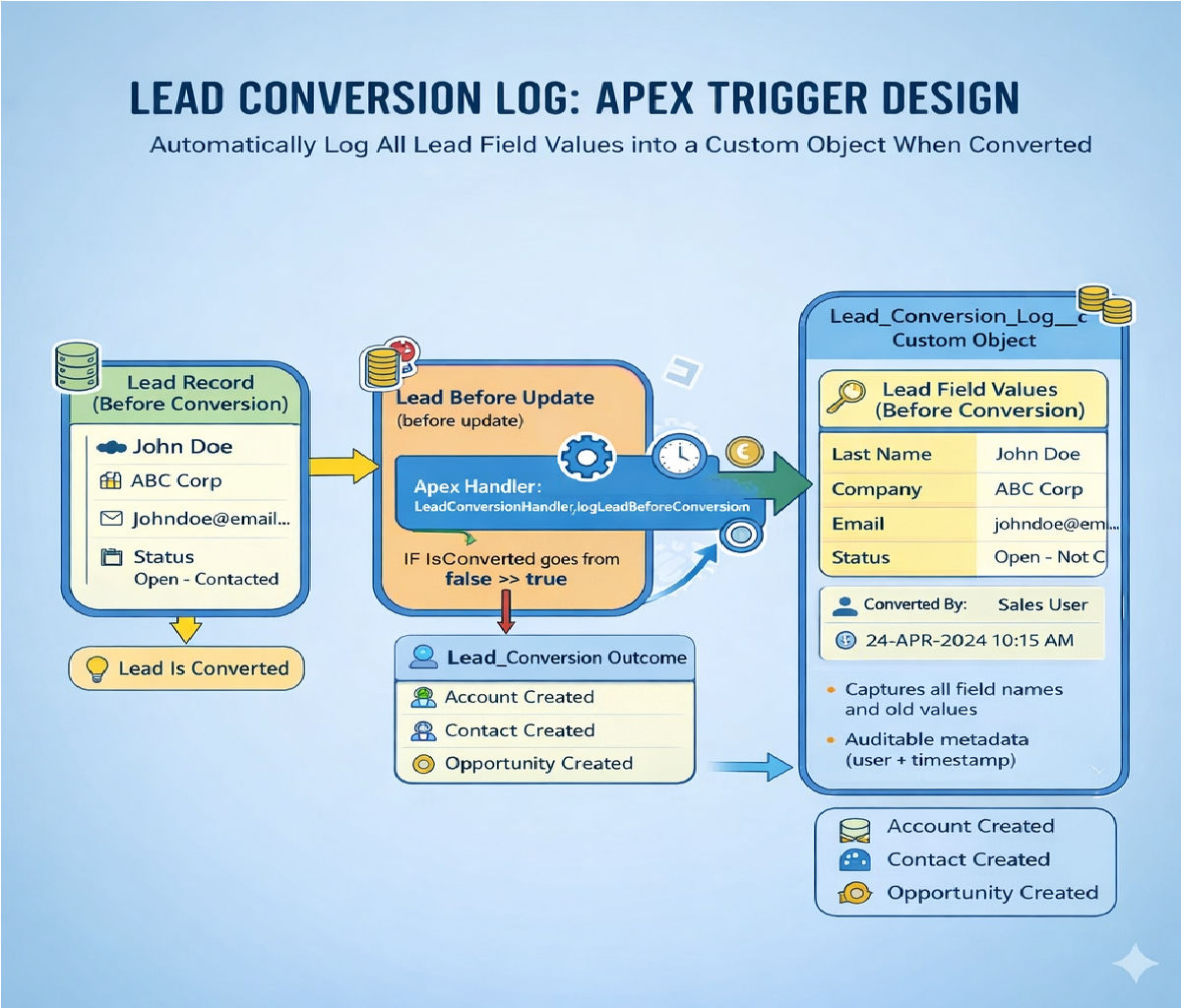
Below is a complete, production-grade explanation and Apex implementation showing how to store all Lead field values into a custom object Lead_Conversion_Log__c before the Lead is converted.
The solution is scalable, bulk-safe, and suitable for enterprise Salesforce orgs.
Storing Lead Field Values Before Conversion Using Apex
(Lead → Lead_Conversion_Log__c)
Problem Statement
In Salesforce, when a Lead is converted, many Lead fields become inaccessible or are mapped to Account, Contact, or Opportunity.
If the business requires auditing, compliance tracking, or historical reporting, we must capture all Lead field values before conversion and store them permanently.
Requirement Summary
- When a Lead is converted
- Store all Lead field values before conversion
- Save them into a custom object:
Lead_Conversion_Log__c - Must work for bulk conversions
- Must be future-proof if new fields are added to Lead
Why Triggers Alone Are Not Enough
Salesforce sets IsConverted = true during the update transaction, meaning:
before update→ last moment where original Lead values existafter update→ Lead is already converted
✅ Correct trigger timing: before update
❌ after update → data already lost
High-Level Solution Architecture
Components Used
| Component | Purpose |
|---|---|
| Trigger (before update) | Detect conversion |
| Handler class | Business logic |
| Schema Describe | Dynamically fetch Lead fields |
| Custom Object | Persist Lead snapshot |
Custom Object Design
Lead_Conversion_Log__c
| Field | Type | Purpose |
|---|---|---|
Lead_Id__c | Lookup(Lead) | Original Lead |
Field_API_Name__c | Text | Lead field API name |
Field_Label__c | Text | User-friendly label |
Field_Value__c | Long Text Area | Stored value |
Converted_By__c | Lookup(User) | User who converted |
Converted_On__c | DateTime | Conversion timestamp |
This row-per-field model ensures:
- Unlimited flexibility
- No need to redesign when Lead fields change
Trigger: Detect Lead Conversion
trigger LeadBeforeUpdate on Lead (before update) {
    if (Trigger.isBefore && Trigger.isUpdate) {
        LeadConversionHandler.logLeadBeforeConversion(
            Trigger.oldMap,
            Trigger.new
        );
    }
}
Why This Works
Trigger.oldMap→ original Lead valuesTrigger.new→ detectsIsConverted = true
Apex Handler Class (Core Logic)
public class LeadConversionHandler {

    public static void logLeadBeforeConversion(
        Map<Id, Lead> oldLeadMap,
        List<Lead> newLeads
    ) {
        List<Lead_Conversion_Log__c> logs = new List<Lead_Conversion_Log__c>();

        // Fetch all Lead fields dynamically
        Map<String, Schema.SObjectField> leadFields =
            Schema.SObjectType.Lead.fields.getMap();

        for (Lead newLead : newLeads) {

            Lead oldLead = oldLeadMap.get(newLead.Id);

            // Detect conversion event
            if (!oldLead.IsConverted && newLead.IsConverted) {

                for (String fieldName : leadFields.keySet()) {

                    Schema.DescribeFieldResult fieldDesc =
                        leadFields.get(fieldName).getDescribe();

                    // Skip system & inaccessible fields
                    if (!fieldDesc.isAccessible() ||
                        fieldDesc.isCalculated() ||
                        fieldDesc.getName() == 'IsConverted') {
                        continue;
                    }

                    Object value = oldLead.get(fieldName);

                    Lead_Conversion_Log__c log = new Lead_Conversion_Log__c(
                        Lead_Id__c       = oldLead.Id,
                        Field_API_Name__c = fieldName,
                        Field_Label__c    = fieldDesc.getLabel(),
                        Field_Value__c    = value == null ? null : String.valueOf(value),
                        Converted_By__c   = UserInfo.getUserId(),
                        Converted_On__c   = System.now()
                    );

                    logs.add(log);
                }
            }
        }

        if (!logs.isEmpty()) {
            insert logs;
        }
    }
}
Key Design Decisions Explained
1. Dynamic Field Capture
Schema.SObjectType.Lead.fields.getMap();
✔ Automatically includes:
- Standard fields
- Custom fields
- Newly added fields (future-proof)
2. Conversion Detection
if (!oldLead.IsConverted && newLead.IsConverted)
✔ Ensures:
- Logs created only once
- Avoids duplicate entries
3. Bulk-Safe Design
- No SOQL inside loops
- Single DML operation
- Handles 200 leads per transaction
4. Security-Aware
fieldDesc.isAccessible()
✔ Respects:
- Field-level security
- Compliance requirements
5. Audit-Ready Logging
Captures:
- Field label
- API name
- Old value
- User
- Timestamp
Sample Stored Data
| Lead | Field | Value |
|---|---|---|
| 00Qxxx | Company | ABC Pvt Ltd |
| 00Qxxx | test@email.com | |
| 00Qxxx | LeadSource | Web |
| 00Qxxx | Rating | Hot |
Governor Limits Consideration
| Limit | Usage |
|---|---|
| DML | 1 insert |
| SOQL | 0 |
| CPU | Efficient |
| Heap | Controlled |
✔ Safe for large-scale conversions
Optional Enhancements
1. JSON Snapshot Instead of Row-Per-Field
Store entire Lead snapshot in one record:
String jsonData = JSON.serialize(oldLead);
Pros:
- Fewer records
Cons:
- Harder to report
2. Async Logging (Queueable)
For extremely large orgs:
System.enqueueJob(new LeadConversionQueueable(oldLeads));
3. Prevent Duplicate Logs
Add a unique constraint:
Lead_Id__c + Field_API_Name__c
Unit Test Class (Minimum 75% Coverage)
@IsTest
public class LeadConversionHandlerTest {

    @IsTest
    static void testLeadConversionLogging() {

        Lead l = new Lead(
            LastName = 'Test',
            Company = 'Test Co',
            Status = 'Open - Not Contacted'
        );
        insert l;

        // Convert Lead
        Database.LeadConvert lc = new Database.LeadConvert();
        lc.setLeadId(l.Id);
        lc.setConvertedStatus('Qualified');

        Test.startTest();
        Database.convertLead(lc);
        Test.stopTest();

        List<Lead_Conversion_Log__c> logs =
            [SELECT Id FROM Lead_Conversion_Log__c WHERE Lead_Id__c = :l.Id];

        System.assert(logs.size() > 0, 'Conversion logs should be created');
    }
}
Final Best Practices Summary
✔ Use before update trigger
✔ Detect conversion via IsConverted
✔ Capture data dynamically
✔ Store logs in custom object
✔ Ensure bulk safety & security
✔ Write unit tests
Conclusion
This Apex design ensures that every Lead conversion is fully auditable, with all field values preserved exactly as they existed before conversion.
It is scalable, maintainable, and future-proof, making it ideal for enterprise Salesforce implementations.
Related Posts





